Imagine Art Review: An Honest Hands-On Test
Imagine Art reviewed by an AI image power user. I used it to design our site's social card. Real screenshots, the pros, the one billing warning to know, and who it's actually for.
I am a hard person to impress with an AI image tool. I run FLUX 2 and Krea 2 for images and Wan and LTX for video on my own GPU, train my own open-source models, and use both open-source and subscription tools, so I am used to fine control and serious output. When I sat down with Imagine Art, I did not want to make a generic “astronaut cat.” I gave it the kind of job I actually care about.
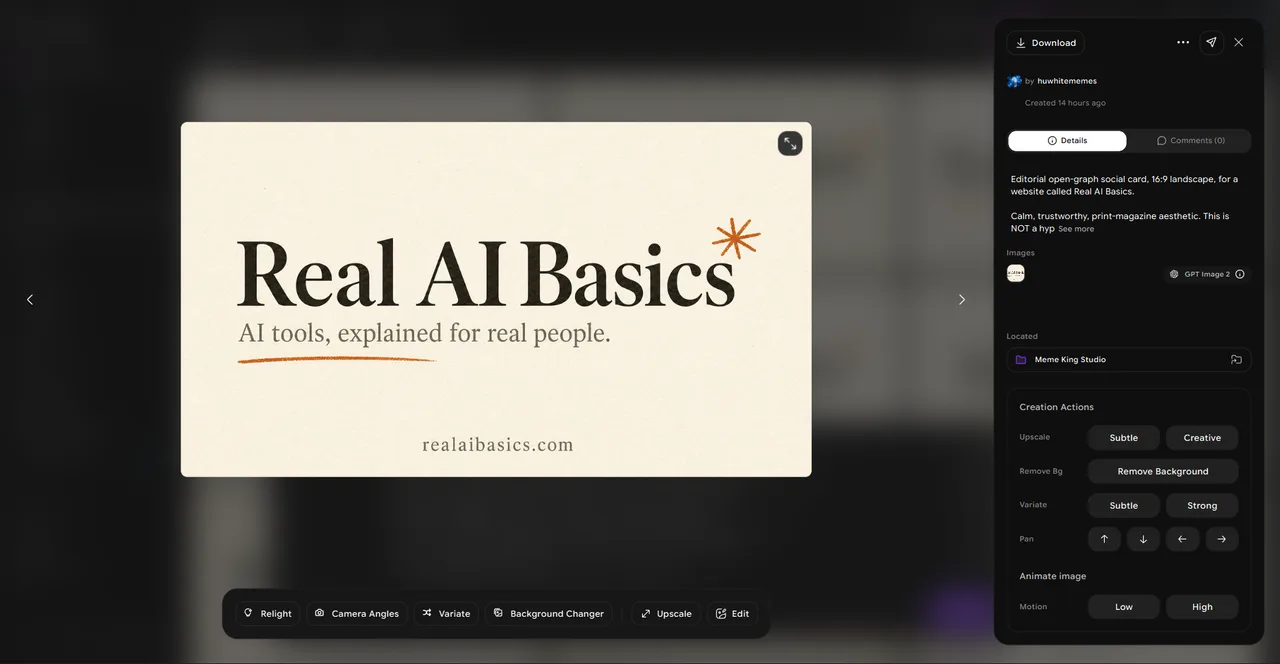
I asked it to design the open graph social card for this website. The real image that shows up when someone shares a link to Real AI Basics.
How I tested it
I graded the result on four things. Did it follow the brief. Did it spell the text right. How usable was the output. And how hard was it to get there. Text is the part AI image tools are worst at, so I made the brief text heavy on purpose.
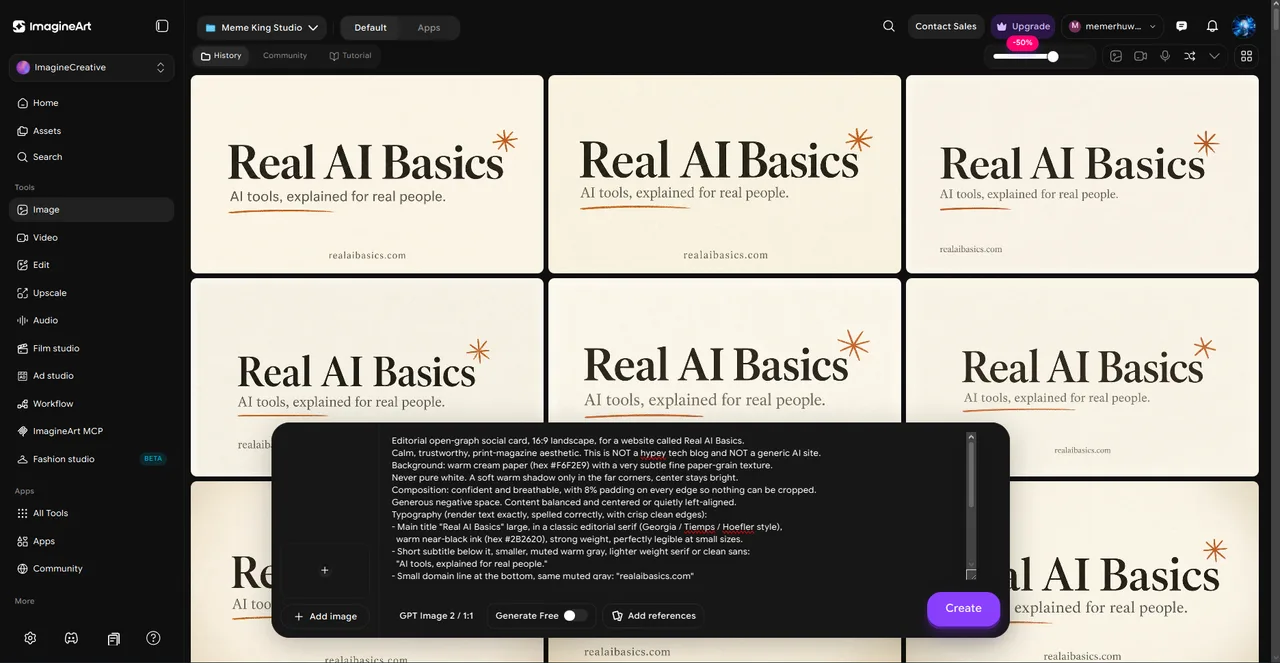
The brief was precise. Warm cream paper background, a classic editorial serif, the title “Real AI Basics” large, a muted subtitle reading “AI tools, explained for real people,” and our domain at the bottom. I picked the GPT Image 2 model.
What came back was a grid of four nearly identical cards, all on brief, with the text spelled correctly and the typography readable. I rerolled once and the second set was the keeper. No cleanup.
That matters more than it sounds. Most image models still mangle text, and Imagine Art spelled it right. The cream background had the faint paper grain I asked for. The corners shaded off the way I described. For one reroll and no manual cleanup, that is a good result.
What Imagine Art actually is
In plain terms, Imagine Art is a model aggregator. One account gets you a drawer full of the big image models, GPT Image, Midjourney V7, Flux (including Flux 2), Ideogram, Nano Banana, Seedream, and more. You are not learning one model. You are picking from a shelf.
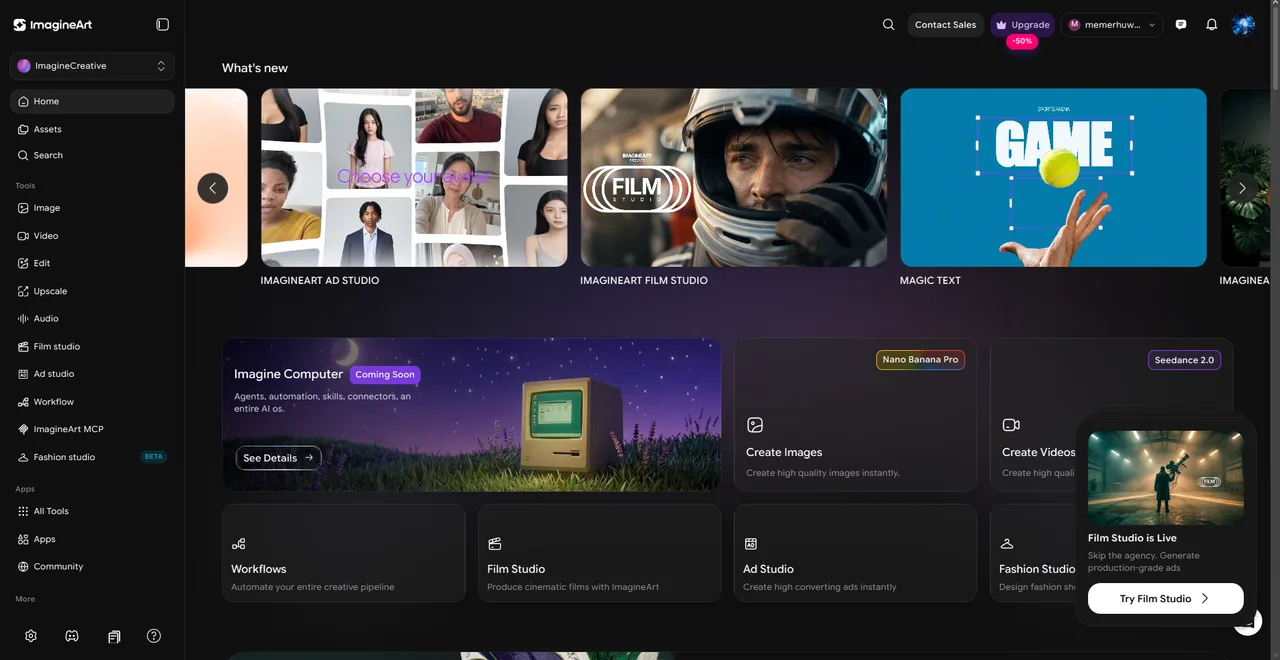
For a beginner that cuts both ways. The shelf is convenient. It also means the first screen asks you to choose between models you have never heard of, which is a lot on day one.
There is a prompt helper that rewrites your plain words into a better prompt. It is the single most useful feature for someone who has never written one, with a catch: it only switches on at the Standard plan and above, so free users write their prompts unaided. There are templates for flyers, logos, social posts, and headshots, so you can start from a template instead of a blank box. The phone app is solid and arguably easier than the website.
Beyond images, Imagine Art has folded in a lot of production tools. Film Studio and Ad Studio turn a prompt or a product link into a finished video. Fashion Studio, still in beta, handles virtual try-ons and outfit swaps. A Lipsync tool makes a still photo talk. There is a face swap app, a background changer, a video object remover, and a music generator. For developers, an MCP connector lets Claude Code or Cursor call Imagine Art straight from your editor.
What it costs
The free tier gives you 100 credits a day, refreshed every 24 hours. Outputs are capped at low resolution, the premium models stay locked, and there are no private generations. It is a real free tier for learning, not for shipping finished work.
Paid plans start at $13 a month, or $9 a month if you pay yearly. Higher tiers add more credits, private generations, and faster priority processing. One catch to know before you pay. Your credits do not roll over. Whatever you do not use by the end of the month is gone. Buying the big plan “to be safe” tends to waste money.
The part I would be dishonest to skip
Across hundreds of verified reviews on Trustpilot and the app stores, the loudest complaints about Imagine Art are not about image quality. They are about money. Auto-renewals people say they did not authorize. Refunds denied inside the stated policy window. A few reviewers say a “lifetime” purchase they paid for later stopped working. The refund rules are narrow, and a lot of people fall outside them.
If you decide to pay, treat it like any subscription you plan to test. Use a prepaid card. Pick monthly, not the yearly prepay. Cancel the moment you are done evaluating. That removes almost all of the risk people are describing.
How it compares
Against the alternatives, the tradeoffs are clear.
Compared to Midjourney, Imagine Art is cheaper to start, has a free tier, and does not make you learn Discord. Midjourney still wins on raw quality and coherence for complex scenes, and on brand reputation.
Compared to ChatGPT image generation, Imagine Art gives you many models in one place and a real phone app. ChatGPT bills more transparently, and its free tier has no watermark.
Compared to Canva Magic Media, Canva is a full design suite rather than just an image generator, and it is the safer first pick if you also need to lay out a flyer or a post. Imagine Art has more art models and a larger free daily allowance.
Compared to Adobe Firefly, Firefly is the safer call for commercial work and legal peace of mind, because Adobe stands behind its outputs. Imagine Art is cheaper and does not lock you into the Creative Cloud ecosystem.
Who it is for
Use Imagine Art if you want to mess with AI image generation for free, you like having every model in one app, and you mostly create from your phone. The free tier is genuinely fun, and you will learn what these tools can do.
Skip it, or pay very carefully, if you need reliable billing and easy refunds, or if you need guaranteed protection for commercial work.
My honest verdict
My score is 7 out of 10. The tool itself is good. It followed a hard brief, rendered text cleanly, and gave me a usable result with one reroll. The one thing that keeps it from a higher score is the billing reputation. For a non-technical person, the person least equipped to fight a denied refund, that risk still has to count.
The advice I would give a friend. Open the free tier, make something, enjoy it. If you want to pay, use a prepaid card and go month to month. That is the safe way to find out if Imagine Art is your tool.
This is a hands-on review. I generated the images shown using Imagine Art. Some links in the scorecard below are affiliate links, which means we may earn a commission if you sign up, at no extra cost to you. That never changes the rating.